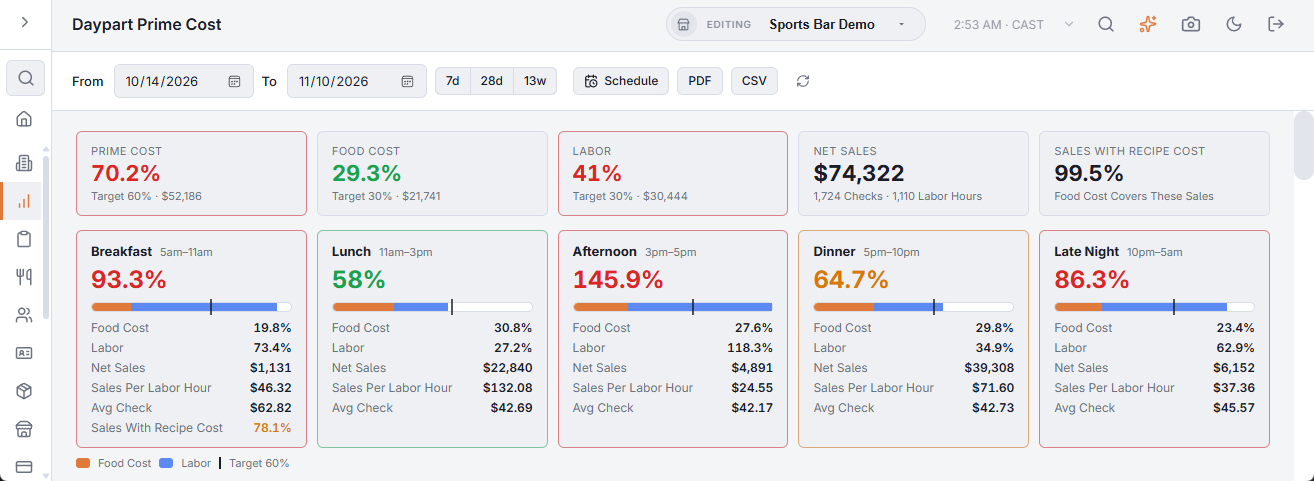
Back Office › Analytics › Performance › Daypart Prime Cost splits prime cost by part of the day. Prime cost — what you spend on food and drink plus what you spend on labor — is the biggest cost a restaurant controls; a healthy restaurant usually keeps it near 60–65% of sales. Splitting it by daypart matters because a busy dinner can hide a lunch that loses money. The page opens on the last 28 days, ending yesterday.
The toolbar
- From / To — the calendar days to include. 7d, 28d and 13w set a range ending yesterday in one tap.
- Schedule — emails the report on a schedule. See Emailing the performance reports on a schedule.
- PDF — preview, download or email the report. CSV downloads the summary, the dayparts, the weekday grid, the best sellers without a recipe cost and the days. Both are greyed out when the range has no sales. The file’s section titles, column headings, day names and Yes/No values are in the language the Back Office is shown in; numbers use a dot for decimals with no thousands separator, and dates are written year-month-day, so a spreadsheet reads them the same in any language.
- The refresh button loads the figures again.
The numbers at the top
- Prime Cost — food cost plus labor as a % of net sales, next to your target and the amount.
- Food Cost and Labor — each against its target, with the amount. Targets come from Menu Costing: cost, margin and a recommended price for every item (target food cost % and labor %); the prime cost target is the two added together.
- Net Sales — with checks and labor hours.
- Sales With Recipe Cost — how much of your item sales has a recipe cost. Below 90% the food cost reads low, the card turns amber and a note above the daypart cards says so.
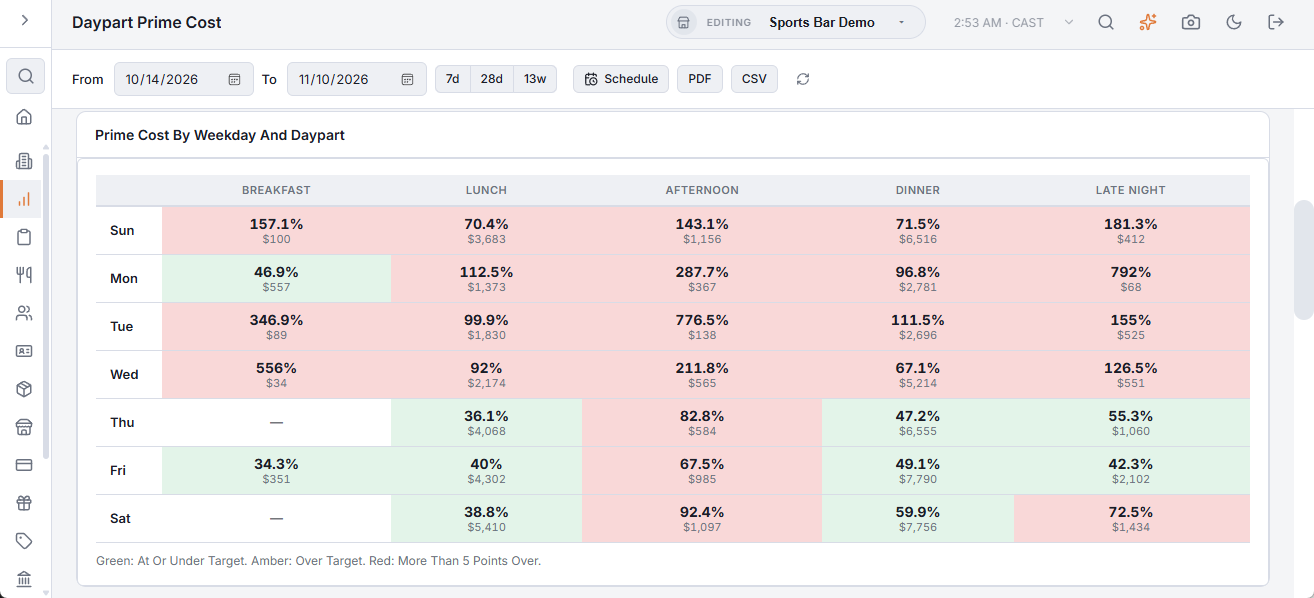
Green is at or under target, amber over, red more than 5 points over. The same colours are used on the KPI cards, the daypart cards, the weekday grid and the By Day list.
The daypart cards
One card per daypart that had sales or labor — Breakfast 5–11, Lunch 11–15, Afternoon 15–17, Dinner 17–22, Late Night 22–5 — with its prime cost, a bar split into food and labor, and a line at your prime cost target; the legend under the cards names the colours. Each card also shows food %, labor %, net sales, sales per labor hour and the average check. When less than 90% of a daypart’s item sales has a recipe cost, the card shows that figure too.
By weekday and daypart
Prime Cost By Weekday And Daypart crosses weekdays with dayparts, so a slow Monday lunch or a heavy Sunday breakfast stands out. Each cell shows the prime cost and net sales; hover it for its sales, food and labor.
Best sellers without a recipe cost
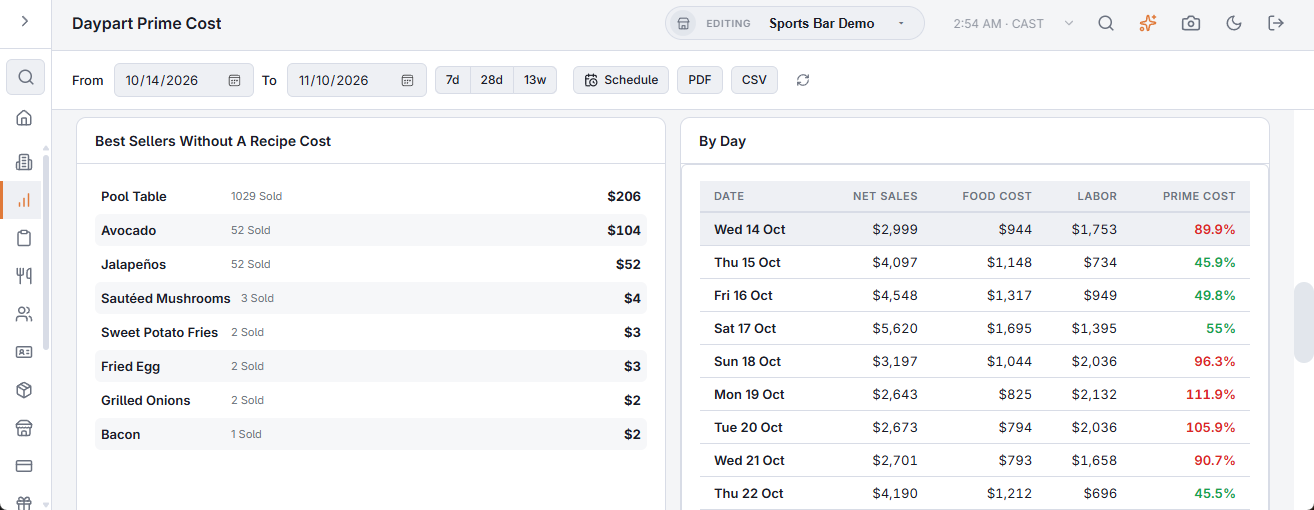
Items without a recipe add nothing to food cost. This list shows the ten best sellers by sales that have none, with units sold and sales — add their recipes in the Recipes (yield, cost, ingredients) and the food cost becomes trustworthy. When every item sold has a recipe cost, the card says so.
By day
By Day lists every day that had sales or labor, with its net sales, food cost, labor and prime cost.
What to do about it
- A daypart high on labor — check Staffing vs Demand: the right people at the right hour for that part of the day.
- A daypart high on food — check the item mix sold then; a lunch special priced too low shows up here. Menu Costing: cost, margin and a recommended price for every item suggests prices.
- A daypart high on both with little in sales — consider shorter hours or a smaller menu for it.