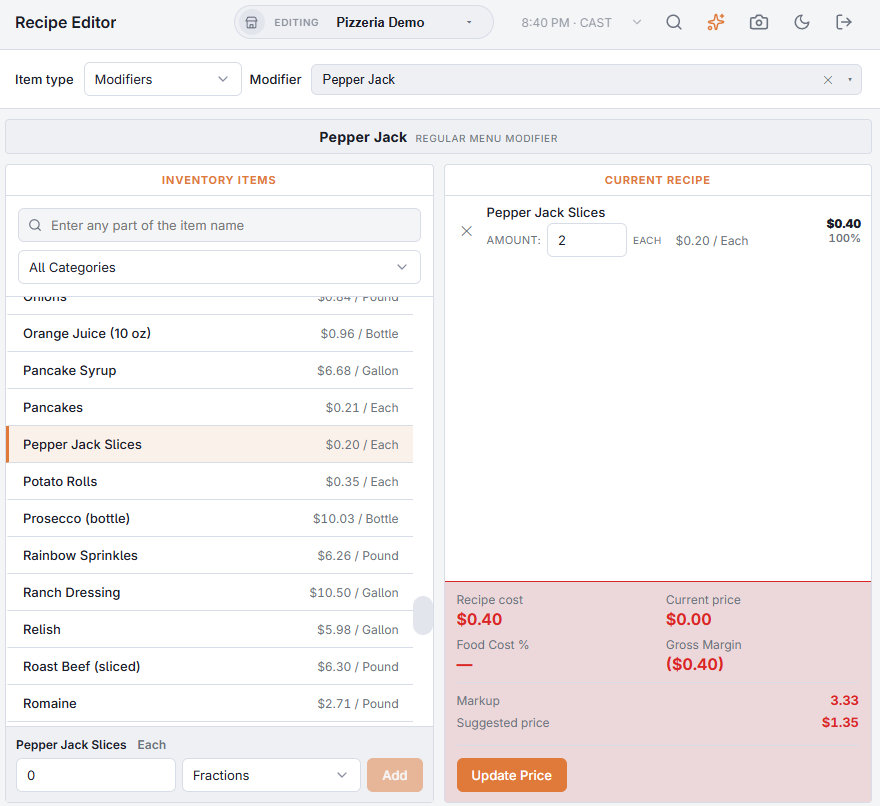
A recipe ties a menu item or modifier to the inventory it uses, so each sale takes stock and has a food cost. Recipes are built in Back Office › Inventory › Setup › Recipe Editor, one item at a time.
Picking what to build
- Item type — Regular menu item, Bar menu item or Modifiers.
- Menu item (or Modifier) — type part of the name and pick it. Each entry shows its category, or its modifier group, underneath.
Adding ingredients
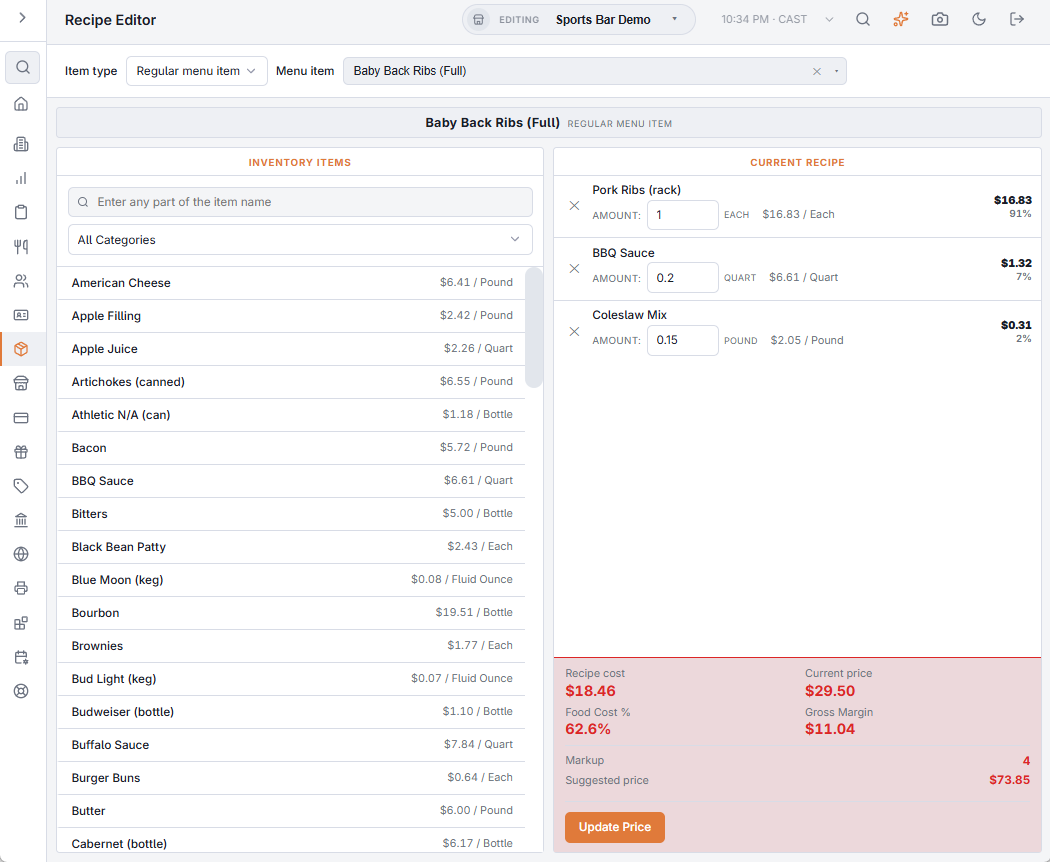
- Find the ingredient in Inventory items on the left: search by name, or pick a category. Each item shows its cost per unit. Hidden items are not listed.
- Pick it and enter the quantity for one serving. If the item has a recipe unit, choose it or the count unit from the list beside the box (see Recipe units: count in one unit, use in another). The Fractions list fills the box with 1/2 to 1/50.
- Choose Add. Cost Per Serving under the box shows what the line will cost.
Every change saves right away: adding a line, changing an Amount in Current recipe, or removing a line with ✕. A burger might be 1 patty, 1 bun and 1.5 oz of lettuce; a well gin and tonic 1.5 oz gin, 4 oz tonic and 1 lime wedge.
What each plate costs
- Each line shows its cost per unit, its cost and its share of the plate, so the expensive line stands out.
- Recipe cost is the total of the lines at current ingredient costs. Food Cost % is that cost as a share of the Current price, and Gross Margin is what’s left of the price after the ingredients.
- An ingredient with no cost yet (never received and no case cost) is tagged No Cost Yet and counts as zero. Prep items use the cost of their prep recipe until their first batch.
Suggested price
Suggested price is the recipe cost × the Markup shown above it:
- for a menu item, the Markup of its menu category (Menu › Menu Setup › Menu Categories);
- for a modifier, the Markup of its modifier group (Menu › Menu Setup › Food Modifiers);
- when there is none, the store’s target food cost % from Menu Costing: cost, margin and a recommended price for every item › Pricing Targets (30% makes a markup of 3.33).
Update Price sets the item’s or modifier’s price to the suggested price. The suggested price is not rounded; Menu Costing applies your rounding rule.
What recipes drive
- Depletion — each sale takes the recipe’s quantities out of stock a few seconds after the order is sent. Modifiers with recipes take theirs too, scaled by the level and the pour size — see How modifiers, levels and pour sizes use stock.
- Food cost — cost of goods and food cost % on Inventory performance come from recipes.
- Stock rules — a menu item runs out when one serving of its recipe needs more than is on hand — see Stock rules: when an item runs out.
Costing the whole menu at once
The Recipe Editor shows one item at a time. Menu Costing: cost, margin and a recommended price for every item lists every item with its recipe cost, food cost %, margin, sales and recommended prices, reprices items from the table, and can Market Check: what comparable items sell for nearby.
Modifier recipes
Modifiers take stock too: “extra cheese” is an ounce of cheese, “bacon” two strips. Set Item type to Modifiers, pick the modifier (listed with its group) and enter its ingredients exactly as for a menu item. Every sale of the modifier then takes that recipe out of stock, scaled by the level the guest chose.