Back Office › Analytics › Performance › Price Change Impact shows, for every menu price you have changed, what the change did to the item’s units and sales. Raising a price usually sells a few fewer units at a higher margin; whether the item ends up earning more or less depends on how many guests walk away from it. The page is read-only.
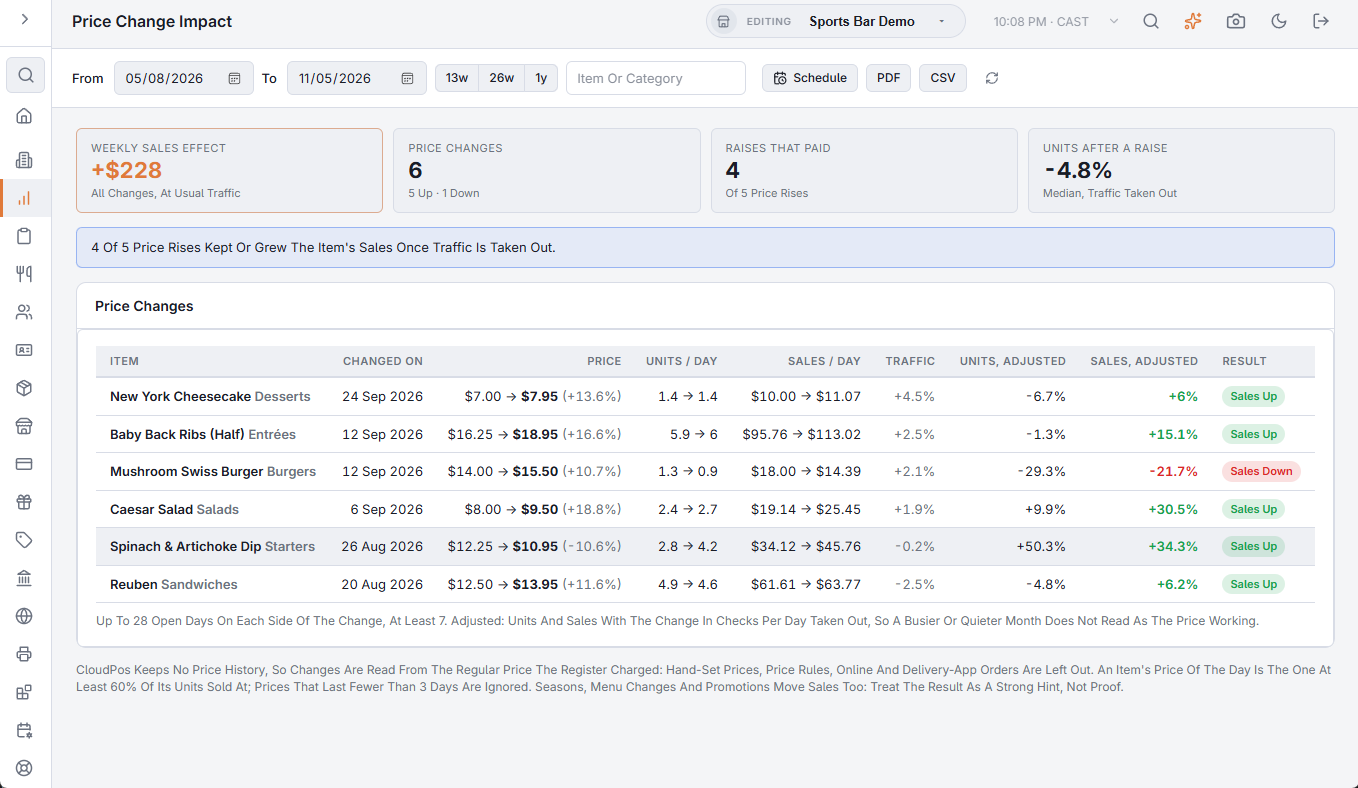
The toolbar
- From and To — when the price changes happened. The page opens on the 26 weeks up to yesterday.
- 13w, 26w and 1y — the last 13 weeks, 26 weeks or a year, ending yesterday.
- The Item Or Category box filters the table as you type.
- Schedule — emails the report as a PDF on a recurrence. A new schedule starts monthly over last month, so the changes have time to show. See Emailing the performance reports on a schedule.
- PDF (preview, download, email) and CSV — the same report as a file. See Exporting and PDF preview. The file’s section titles, column headings, day names and Yes/No values are in the language the Back Office is shown in; numbers use a dot for decimals with no thousands separator, and dates are written year-month-day, so a spreadsheet reads them the same in any language.
- The refresh button loads the figures again.
When no change is found, the page shows No Price Changes Found; try a longer range.
How a price change is found
CloudPos keeps no history of menu prices, so the report reads changes from what the register charged. Only menu items on settled checks rung at the register count, at their regular price: prices set by hand at the register, Price rules, online orders and delivery-app orders are left out (they carry their own prices), and so are modifiers, removed, comped and voided lines, timed items and items sold by weight. An item’s price of the day is the price at least 60% of its units sold at; a price that lasted fewer than 3 days is ignored. A change is the first day of a new price.
Reading a row
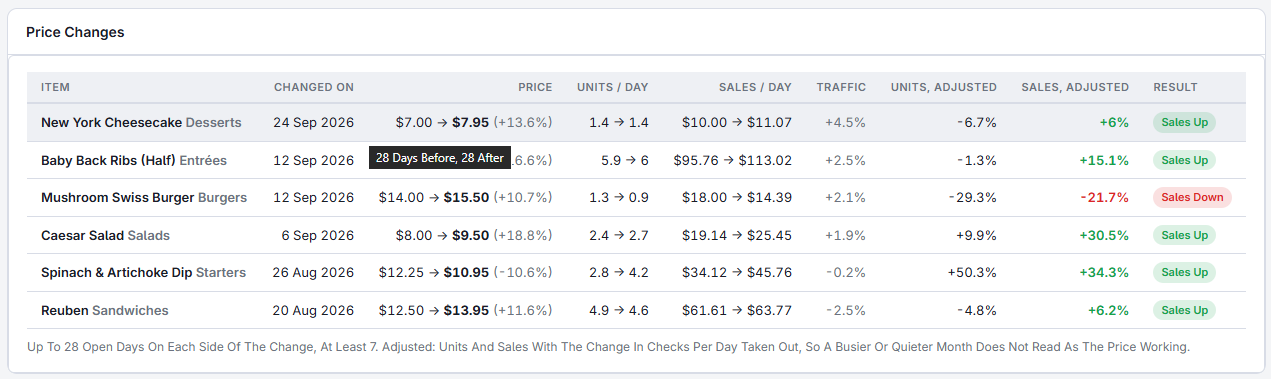
- Item and Changed On — the item with its category, and the first day of the new price. Hover the date to see how many days before and after were compared.
- Price — old price, new price and the change in percent.
- Units / Day and Sales / Day — for up to 28 open days at the old price and 28 at the new one; at least 7 on each side.
- Traffic — the change in checks per open day for the whole store. A price rise just before the busy season looks great unless this is taken out.
- Units, Adjusted and Sales, Adjusted — the change with the traffic change taken out. This is the column to judge by.
- Result — Sales Up when adjusted sales rose 2% or more, Sales Down when they fell 2% or more, otherwise About Even. Early means the latest price has fewer than 28 days behind it; check again later.
The cards at the top
- Weekly Sales Effect — what all the changes are worth per week at your usual traffic. Amber when negative.
- Price Changes — how many were found, with how many went up and down.
- Raises That Paid — price rises with Sales Up, out of all price rises.
- Units After A Raise — the median change in units after a rise, with traffic taken out.
With at least three price rises that are not early, a blue note says how many of them kept or grew the item’s sales, or how many lost sales.
What to do with it
- A raise with sales up — guests barely noticed; similar items in the same category can probably take a rise too.
- A raise with sales down — guests switched away. Check whether they moved to a cheaper item in Product mix before rolling the price back.
- Seasons, menu changes and promotions also move sales: treat the result as a strong hint, not proof.
The AI assistant can answer the same questions: “Did raising the burger price hurt sales?”