Back Office › Analytics › Performance › RevPASH shows revenue per available seat-hour: how much each seat in your dining room earns for every hour you are open. It is the number full-service restaurants use to decide when to staff up, when to run a promotion and how long to hold a table for a reservation, because it shows which hours leave seats empty or under-used.
RevPASH is two things multiplied together: how full the seats were (seat occupancy) and how much guests spent while they sat there (spend per occupied seat-hour). The report shows all three, so for every slow hour you can see which one to work on.
Before you start
Seats are counted from your seating chart, so every table needs its Max Guests set in the seating chart designer (see Table properties explained). Pool tables, lanes and other timed tables are left out; a store without seats on its seating chart sees No Seats On The Floor Plan instead of the report.
Opening the report
The report opens on the last 28 business days, ending yesterday (today is not over yet).
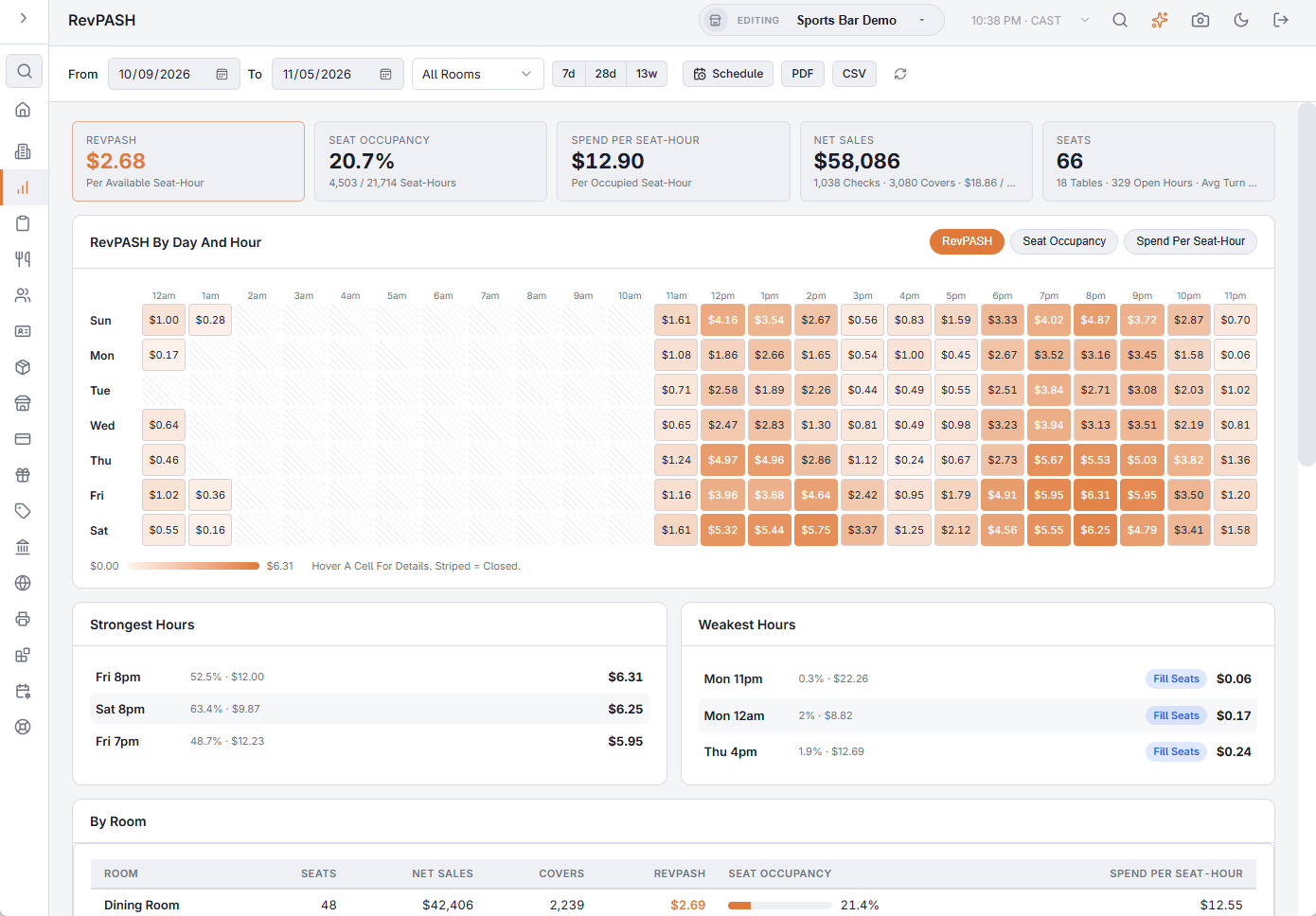
- From / To — the business days to include. 7d, 28d and 13w set the range in one tap.
- Room picker — shown when your seating chart has more than one room; pick one to see only its seats and sales, or All Rooms.
- Schedule — emails the report on a schedule, for the room you picked. See Emailing the performance reports on a schedule.
- PDF — preview, download or email the report. CSV exports every table of the report for a spreadsheet; it is greyed out when the range has no table sales. The file’s section titles, column headings, day names and Yes/No values are in the language the Back Office is shown in; numbers use a dot for decimals with no thousands separator, and dates are written year-month-day, so a spreadsheet reads them the same in any language.
- The refresh button loads the figures again.
The five numbers
- RevPASH — net sales divided by the available seat-hours (seats × open hours).
- Seat Occupancy — the share of available seat-hours that had a guest in them, with both seat-hour figures.
- Spend Per Seat-Hour — net sales divided by the seat-hours guests actually sat. This is what a guest spends per hour at the table.
- Net Sales — with the number of checks, covers and the average sale per cover.
- Seats — with the number of tables, the open hours counted and the average time a table was held.
When no settled check was seated at a table in the range, the page shows the five numbers and No Table Sales in place of the rest.
The heatmap
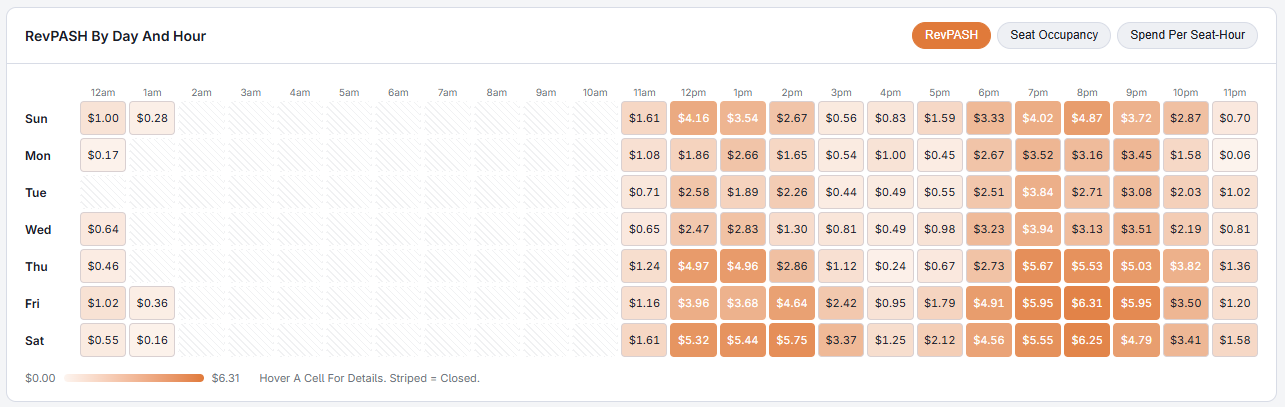
RevPASH By Day And Hour has a row per day of the week and a column per hour of the day; the darker the cell, the higher the number. Use the buttons at the top right of the card to switch between RevPASH, Seat Occupancy and Spend Per Seat-Hour. Hover a cell to see all three figures, its net sales and on how many days that hour was open. Striped cells are hours the store was never open in the range.
Strongest and weakest hours
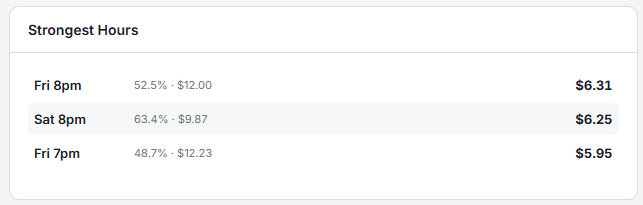
The three best and three worst hours by RevPASH, counting only hours open on at least two days so a single odd day can’t top the list. The cards appear once there are at least four such hours. Each weak hour carries a tag telling you what to work on:
- Fill Seats — occupancy in that hour is below your average. The seats sit empty: bring in more guests with reservations, promotions, events or a happy hour.
- Raise Spend — the seats are filled but guests spend little. Work on suggestive selling, add-ons, desserts and drinks, or the prices of what sells in that hour.
Rooms and days
By Room (stores with two or more rooms) compares the rooms side by side, highest RevPASH first — a patio that is full at lunch and empty at dinner shows up here. Click a room to filter the whole report to it; click it again for all rooms. By Day lists every open business day with its open hours, net sales, covers, RevPASH and occupancy, so a holiday or a rainy evening is easy to spot.

How the numbers are worked out
- Net sales are the check subtotal less discounts — no tax, tips, gratuity, surcharges or delivery charges. Only settled, non-void checks seated at a table count.
- A check holds its table from the moment it was started to its last payment, at least 10 minutes and at most 6 hours. A check with no payment counts as 60 minutes.
- Each check’s sales and seat time are spread over the hours it held the table, so a dinner from 7:40 to 9:10 counts in the 7, 8 and 9 o’clock cells.
- Checks at the same table at the same time are one party, and a split check counts its party once, from when they sat down.
- Seats come from today’s seating chart. If you rearranged tables during the range, the figures before the change are approximate — start the range after the change for an exact comparison.
- Open hours run each day from the first table seated to the last table cleared, in whole hours. Days with no table checks count as closed and don’t pull the average down.
- Checks on tables that are no longer on the seating chart are left out; a note under the report says how many and their sales.
RevPASH on the register
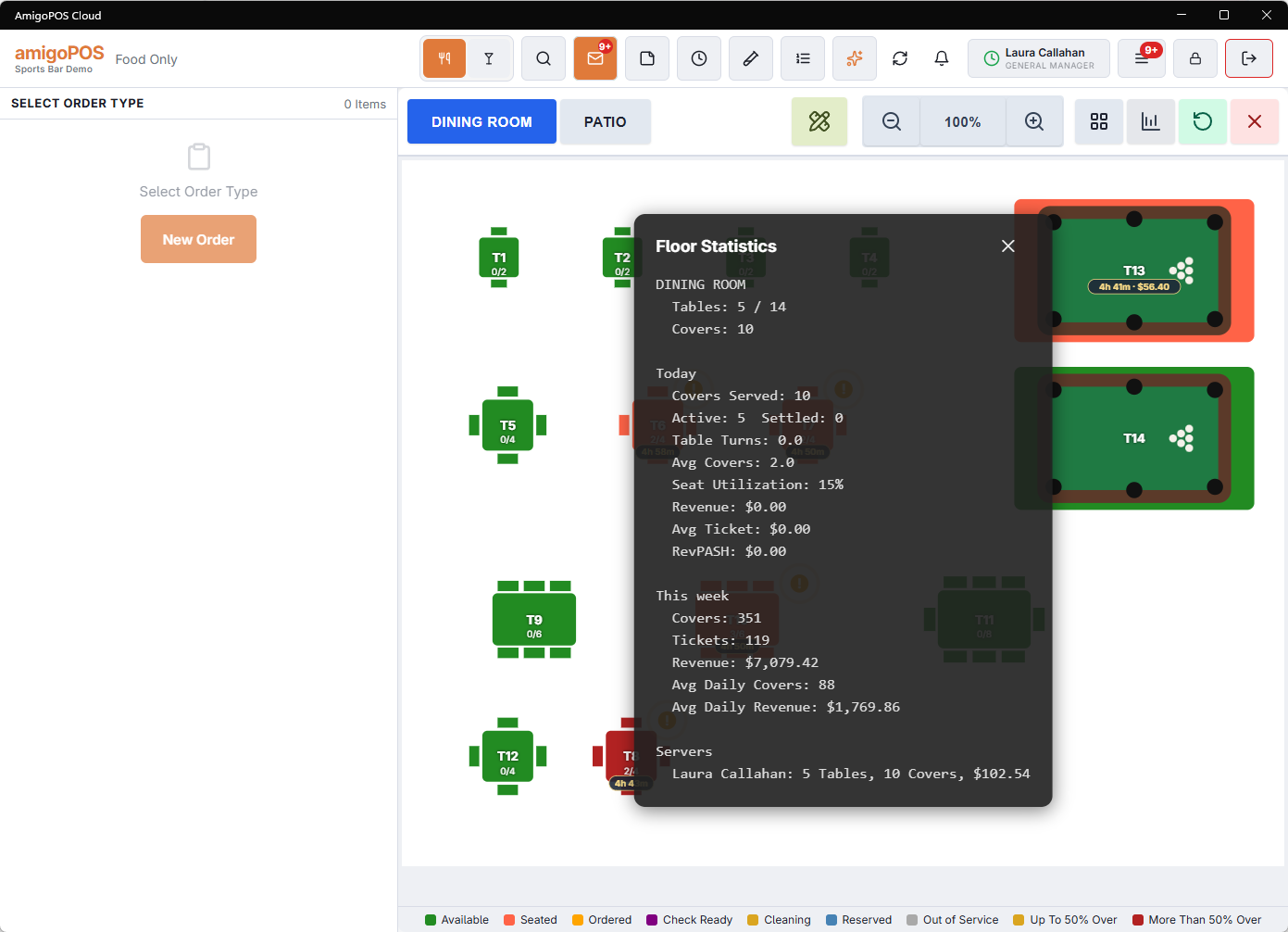
The Floor Stats panel on the table screen shows today’s RevPASH so far, worked out the same way, with the hours running from the first table seated until now.
Ask the assistant
The AI assistant can answer RevPASH questions too, for example “What was our RevPASH last month?”, “Which hours are we filling seats worst?” or “How full is the dining room on Tuesday nights?”
Related: Server Pace Report, for how long each step of the meal takes.
Combined tables
A party that held more than one table has its sales and covers shared across those tables by seat count, so each room and each hour gets the part its seats earned. The check is counted once, totals do not change, and these parties are left out of the average turn. When the period has any, a Combined Tables note above the footnote gives their number. See Combining tables for a large party.