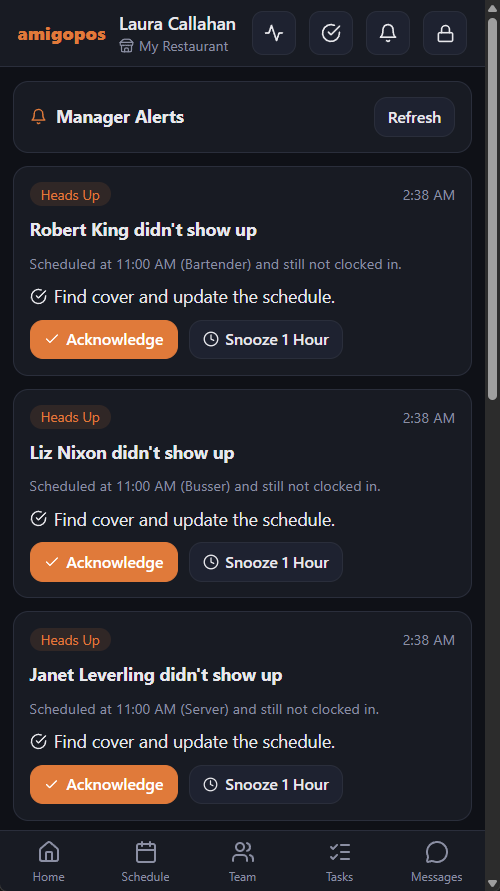
Manager alerts watch the store while it trades and tell managers when something is costing money — labor running ahead of sales, someone heading into overtime, a cash void after a check was paid, an ingredient about to run out. Every alert says what is happening and what to do about it.
How it works
- Every 5 minutes, for every store with someone on the clock, the system checks the day so far against the store’s thresholds.
- Each problem raises one alert per day. It only alerts again if it gets worse — labor crossing the next 5 points over target, for example.
- When the problem goes away, the alert closes itself and shows as No Longer Happening.
- Acknowledge tells the other managers you are on it — the alert closes for everyone and shows your name. Snooze 1 Hour hides it for an hour.
Where alerts show up
- As a push notification on managers’ phones, through the staff site.
- On the staff site’s Alerts page: More › Manager Alerts, or the Manager Alerts row under Needs You on Home.
- At the top of the staff site’s Today page, with the day’s figures — see Today: the manager’s day on their phone.
- In the bell on the register’s top bar, for managers.
- In Back Office › Activity › Shifts & End of Day › Manager Alerts, where you can also look back at earlier days.
See Getting and handling alerts.
What it watches
- Labor and staffing for the volume
- The time clock
- Sales and service
- Loss prevention
- Inventory and cost
- Cash drawers and the morning forecast
Manager alerts are off until you turn them on for the store: Back Office › Activity › Shifts & End of Day › Manager Alerts › Settings. See Turning alerts on and setting the thresholds. Alerts are kept for 90 days.
Security alerts
Locked accounts, new devices, guessing and similar security events reach managers separately, as a quick alert in the register inbox. See Security alerts.