A time-based item bills by elapsed time instead of a fixed quantity: pool tables, bowling lanes, karaoke rooms, VR booths, hookah, coworking desks, equipment rentals and similar. You set a price per interval; the POS runs a live timer and the charge grows until the timer stops. For the bigger picture — tables, lights, the guest page — see Pool tables and timed games.
Creating a time-based item
- Open Back Office › Menu › Menu Setup › Menu Items and create (or edit) the item as usual — name, category, button and Price. The price is the charge per interval, not per hour, unless your interval is 60.
- Open the Time-Based tab and tick Time-based.
- Fill in the fields below and save.
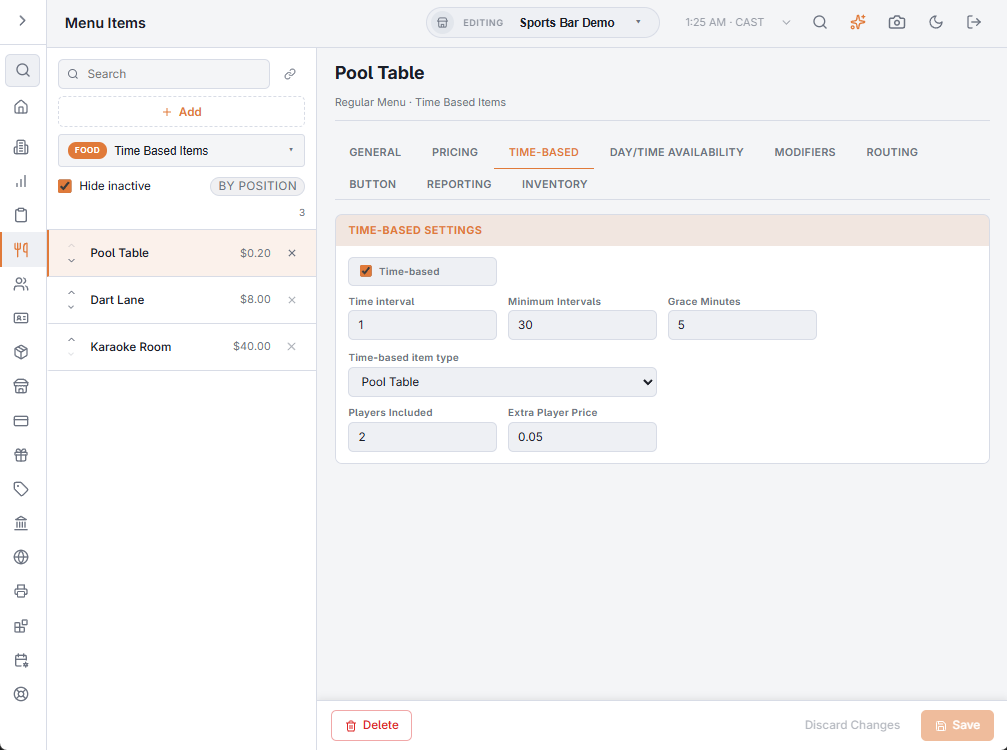
The fields
| Field | What it does |
|---|---|
| Time-based | Turns timed billing on. When off, the other fields are ignored and the item sells normally. |
| Time interval | The billing unit in minutes. Elapsed time is divided by it and rounded up. 1 = per minute, 15 = quarter hours, 60 = per hour. |
| Minimum Intervals | The fewest intervals ever charged, even if the timer stops sooner. Interval 60 with minimum 1: a 10-minute game still bills one hour. |
| Grace Minutes | Minutes past each interval before the next one is charged (0–120). Interval 60 with 5 grace: up to 65 minutes bills 1 hour, 65–125 bills 2. |
| Time-based item type | Pool Table, Bowling Lane, Karaoke Room… Chooses the tile icon at the register and — more importantly — which tables on the floor plan start this item. See Linking tables to timed items. |
| Players Included | How many players the price covers. See Charging by number of players. |
| Extra Player Price | Charged per interval for each player beyond those included. Leave at 0 for a plain table rate. |
Pricing examples
- Pool table $12/hour, one-hour minimum, 5 minutes’ grace: Price 12.00, Interval 60, Minimum 1, Grace 5.
- Karaoke room $5 per 15 minutes, half-hour minimum: Price 5.00, Interval 15, Minimum 2.
- Kayak rental $1 a minute, 20-minute minimum: Price 1.00, Interval 1, Minimum 20.
- Pool $10/hour for two, $3 per extra player: Price 10.00, Interval 60, Players Included 2, Extra Player Price 3.00.
How the charge is calculated
intervals = max(Minimum, (elapsed minutes − Grace) ÷ Interval, rounded up)line total = intervals × rate per interval
The rate per interval is the price, adjusted by any price rule in effect when that interval starts (happy hour — see Happy hour and rate changes during a game) and by extra players. Tax applies through the item’s normal tax rate.
Things to know
- One item can run on many tables at once — each table’s game is its own line on its own check. Create separate items only for different rates (for example a premium table).
- Time-based items do not print prep tickets.
- The timer keeps counting while the order is parked; the charge is based on when the game started.
- A new or edited time-based item reaches the POS on its next menu refresh — no restart needed.