Back Office › Inventory › Setup › Main Settings holds the lists the rest of inventory is built on — categories, units, vendors, aisles and adjust reasons — and the store’s stock rule. Each list is a tab. Items can’t be created on Items List until there is at least one category, unit, vendor and aisle.
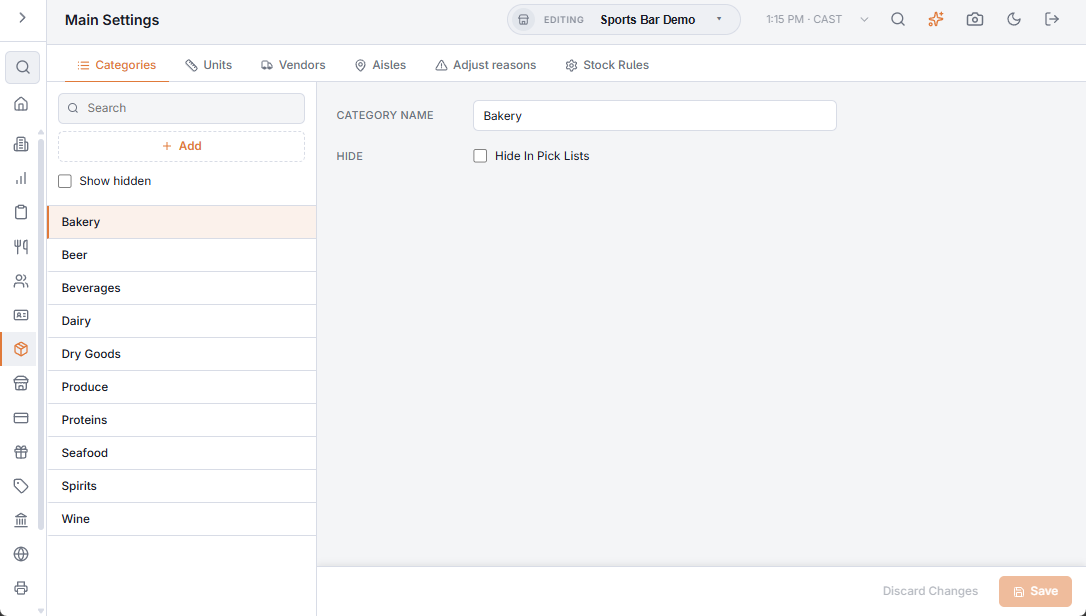
Working with a list
- The left side lists the entries, with a search box and a + button to add one. Categories, vendors and aisles also have Show hidden, which brings hidden entries back into the list (greyed).
- Pick an entry to open it on the right. Changes are kept until you choose Save; Discard puts the entry back as it was. A name is required.
- Only adjust reasons can be deleted. Categories, vendors and aisles are hidden instead, so the history that uses them keeps its names.
The tabs
| Tab | What you enter | Where it is used |
|---|---|---|
| Categories | Category name and Hide. | Groups items on Items List, the count page and the Inventory Valuation report, which subtotals by category. |
| Units | Unit name, Abbreviation, Pack description and Case description (new units start with Pack and Case). | Every item is counted, received and valued in one unit. The pack and case descriptions name the boxes on the printed count sheet. |
| Vendors | Name, address, phone, hours, notes, Preferred and Hide. | Receiving, purchase orders and each item’s suppliers — see Vendors. |
| Aisles | Description, Sort Order and Hide. | Each item’s stock aisle. The count page and the count sheet walk the aisles in sort order. |
| Adjust reasons | Description. A reason can be deleted. | The reasons offered when you record waste and on each line of a count. They show in the Shrinkage tab of Inventory logs. |
| Stock Rules | One choice under When An Item Runs Out. It saves as soon as you pick it. | What the POS does when a menu item can’t be made from stock — see Stock rules: when an item runs out. |
Hidden entries
The Hide box reads Hide In Pick Lists. A hidden category, vendor or aisle stays on the items and records that already use it, but it is no longer offered when you pick one — in the item editor, for example, or a vendor on Receive Inventory and Purchase Orders.
Main Settings, Recipe Editor and Menu Costing need the Inventory Settings permission. For how stock moves once the lists are in place, see How inventory works.