Inventory follows every item from the delivery door to the plate. This topic explains the moving parts once, so the numbers on the Back Office › Inventory pages make sense.
In one picture: what adds stock, what takes it, and what can do either.
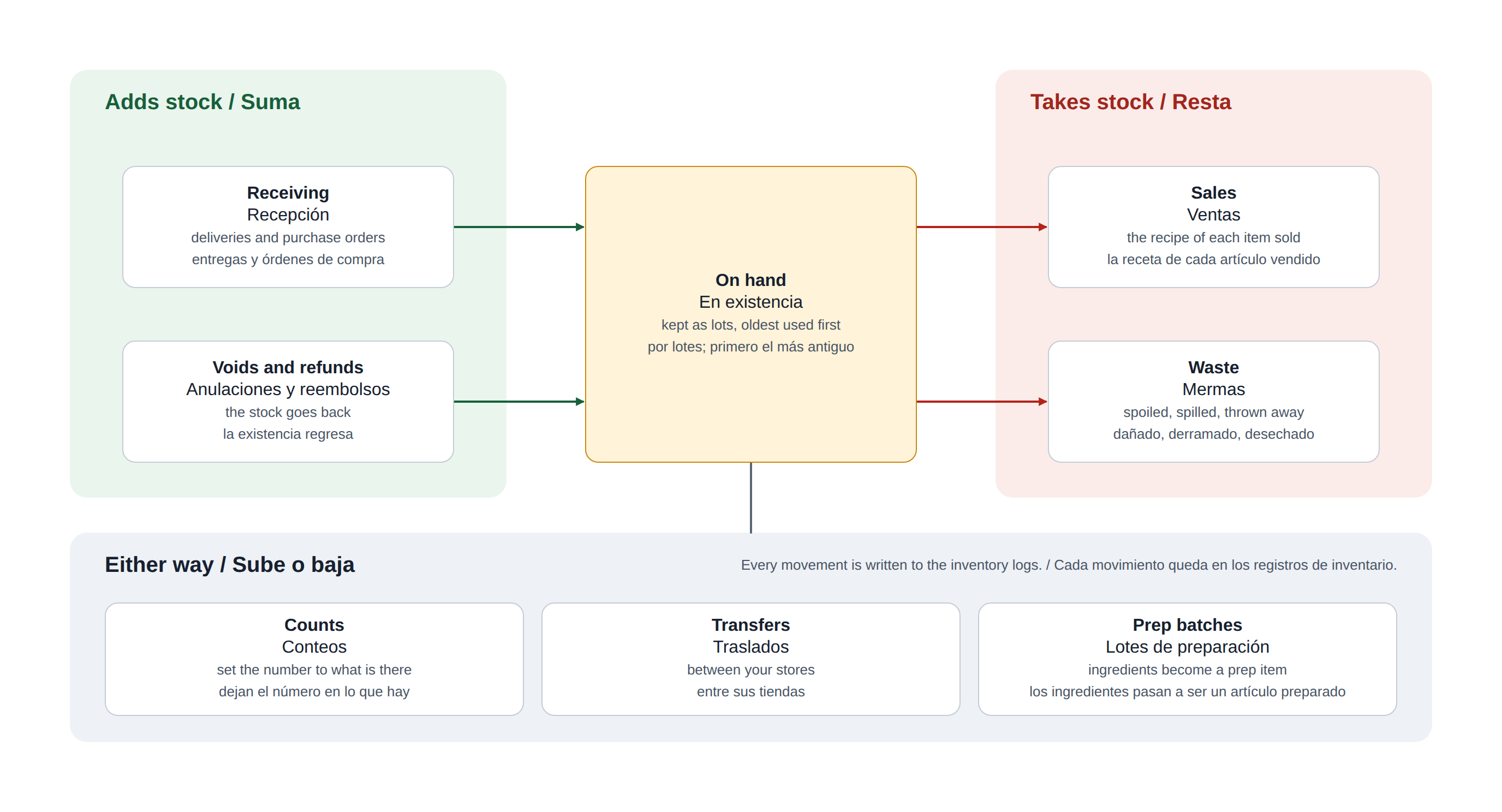
What moves stock
- Sales take each item’s recipe out of stock a few seconds after the order is sent. Modifiers with recipes take theirs too, scaled by the modifier level and the pour size — see How modifiers, levels and pour sizes use stock.
- Voids, returns and refunds put the stock back. Lowering the quantity on a line that was already sent puts back the difference.
- Receiving adds stock at the delivery’s cost, whether you receive a delivery by itself or against a Purchase orders.
- Waste, counts and transfers each record their own movement, and all of it shows in Inventory logs.
- Prep batches take their ingredients out and put the prep item in; they are listed on the Prep page — see Making prep batches.
On hand, cost and stock value
Every delivery is kept as its own lot with its own cost, and stock is used oldest first (FIFO), so each sale is costed at what that stock actually cost.
- On Hand is what is left across all lots.
- Stock Value is what those lots cost.
- Cost Per Unit is the current cost that recipes and food cost use: the average cost of the stock on hand, else the last delivery, else the case cost.
All three show at the top of the item editor — see Items, units, aisles, categories.
Selling more than you have
When a sale needs more than is on hand, the sale still goes through and the item shows as Oversold (below zero). The next delivery or count fills that gap first, so the numbers catch up on their own. Whether the POS should instead warn or stop the sale is set in Stock rules: when an item runs out.
Days and times
Inventory is kept by the store’s business day, set by Business Day Start Time (Store Setup › General Settings, Reporting): when the day starts at 4 a.m., a sale at 1 a.m. belongs to the night before. End of day applies any sales still waiting before it records the day’s closing stock — see End-of-day inventory.
What the stock is worth
Because every lot keeps the cost it was received at, the value of the stock on hand is always known. The Inventory Valuation: what your stock is worth report (printer button on Items List) totals it by category for month end; Menu Costing: cost, margin and a recommended price for every item uses the same costs to show what each menu item costs to make and what it should sell for.