A sale takes the menu item’s recipe from stock. Three things change how much: the recipes of the modifiers added to it, the level picked with a food modifier, and the upcharge a bar item is sold with. Recipes are entered in Back Office › Inventory › Setup › Recipe Editor, levels in Back Office › Menu › Menu Setup › Food Modifiers and upcharges in Back Office › Menu › Menu Setup › Menu Categories.
Modifiers with recipes
A modifier can have its own recipe, the same way as a menu item — “Add Bacon” with two strips of bacon. In the Recipe Editor, set Item type to Modifiers and pick the modifier; the list holds both food and bar modifiers. See Recipes (yield, cost, ingredients).
Each time the modifier is sold, its recipe comes off stock along with the item’s. A modifier with no recipe takes nothing.
Levels: Extra, Lite, No
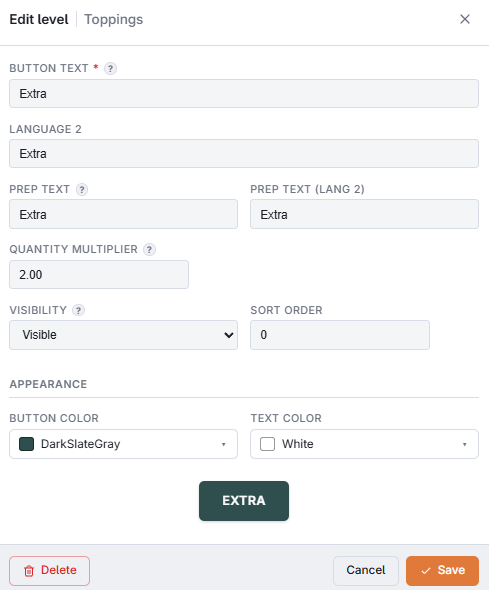
Levels exist only for food modifiers. Open a group in Food Modifiers, go to its Levels tab and open a level (or choose Add level). Its Quantity multiplier is the share of the modifier’s recipe that one serving at that level takes:
- 1 — a full serving. New levels start at 1.
- 2 — double, for an Extra level; 0.5 half, for a Lite level.
- 0 — nothing, for a level such as Hold or On The Side.
The field takes a value from 0 to 99. A modifier picked without a level takes its recipe once. The multiplier never changes the price; prices per level are set on each modifier — see Food modifiers, groups, and levels.
A level named No, None, Without or Sin (or the Arabic equivalents) is a removal, whatever its multiplier: it takes nothing from stock, is never charged and never uses an included slot. On the register it also does not count toward the group’s required or maximum choices.
Levels take stock the same way on orders from the register, the online ordering site and QR table ordering.
Bar modifiers and qualifiers
Bar modifiers have no groups and no levels. A bar modifier with a recipe, such as a Red Bull with one can, takes its recipe once each time it is added to a drink. A qualifier tapped before a bar modifier changes the text on the ticket, not what the modifier takes — except a qualifier with Removes The Mixer ticked (qualifiers named No, None, Without or Sin start ticked): then the modifier takes nothing from stock. Its price is unchanged. See Bar modifiers, qualifiers, and recipes. See Bar modifiers, qualifiers, and recipes.
Pour sizes: bar upcharges
Sizes such as Double or Tall are the upcharges of a bar category. Each upcharge has an Inventory Adjustment, which multiplies the drink’s recipe when the drink is sold with that upcharge: 2 for a Double takes twice the pour, and 1 the normal pour. 0 or an empty box also counts as the normal pour. See Bar menu upcharges (Double, Tall, Premium, Virgin).
- The adjustment applies to the drink’s own recipe only. Bar modifiers on the drink take their own recipe once: a Double vodka with Red Bull takes two pours of vodka and one can.
- If a bartender changes the upcharge on a drink that was already sent, stock is corrected: what the drink took is put back and the new size is taken, dated at the original sale.