Back Office › Analytics › Performance › Channel Profitability shows what each way of selling leaves you. A $30 delivery order and a $30 dine-in check don’t leave you the same money: the page takes each channel, subtracts the food cost and what the delivery apps keep, and shows what is left — per channel and per check. It opens on the last 28 days, ending yesterday.
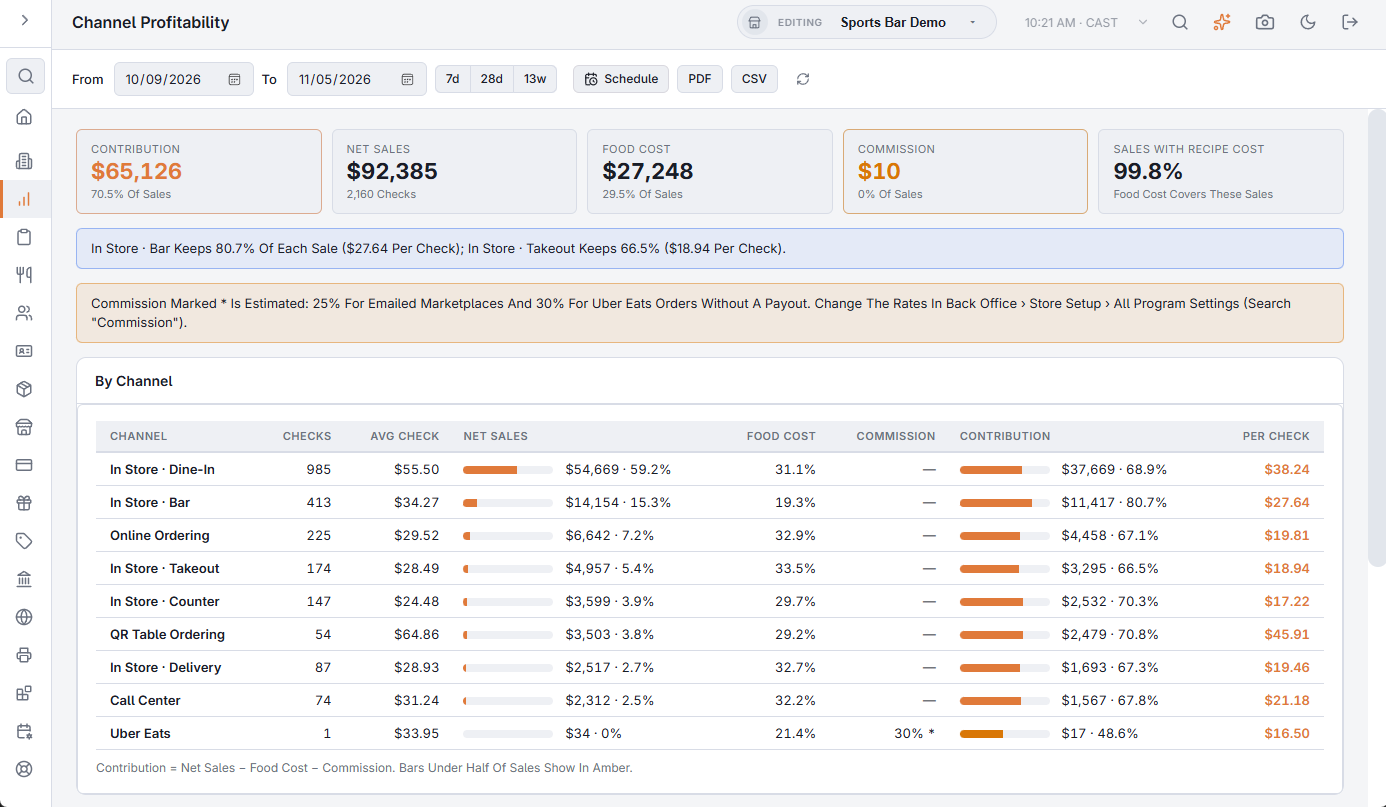
The toolbar
- From / To — the business days to include. 7d, 28d and 13w set a range ending yesterday in one tap.
- Schedule — emails the report on a schedule. See Emailing the performance reports on a schedule.
- PDF — preview, download or email the report. CSV downloads the summary, the channels (with covers, discounts and delivery fees as well) and the weekly mix. Both are greyed out when the range has no sales. The file’s section titles, column headings, day names and Yes/No values are in the language the Back Office is shown in; numbers use a dot for decimals with no thousands separator, and dates are written year-month-day, so a spreadsheet reads them the same in any language.
- The refresh button loads the figures again.
The channels
Each settled check goes to one channel, first match wins: Uber Eats, an emailed marketplace (DoorDash, Grubhub… each on its own row), QR Table Ordering, Online Ordering, Call Center, and otherwise In Store, one row per order type (Dine In, Take Out, Bar…).
The numbers
The cards at the top show Contribution (with its share of sales), Net Sales (with checks), Food Cost and Commission (each with its share of sales) and Sales With Recipe Cost. The By Channel table has one row per channel, largest sales first:
| Column | What it shows |
|---|---|
| Checks, Avg Check | Settled checks in the channel and their average net sale. |
| Net Sales | Subtotal less discounts; no tax, tips or delivery fees. The bar shows the channel’s share of all sales. |
| Food Cost | As a % of the channel’s sales. Theoretical: units sold × recipe cost from Menu Costing: cost, margin and a recommended price for every item. |
| Commission | For Uber Eats, the share Uber kept on each order (order total less its payout), applied to net sales. For emailed marketplaces, and Uber orders without a payout, an estimate — marked *. |
| Contribution | Net sales − food cost − commission, with its share of sales. Bars under half of sales show in amber. |
| Per Check | Contribution per check. |
Sales With Recipe Cost is how much of item sales has a recipe. Below 90% the food cost reads low; add recipes for the best sellers first.
The blue note under the cards compares the channel that keeps the most of each sale with the one that keeps the least, counting only channels with at least 10 checks. When any commission is estimated, an amber note gives the rates used and where to change them: Back Office › Store Setup › All Program Settings, searching for Commission.
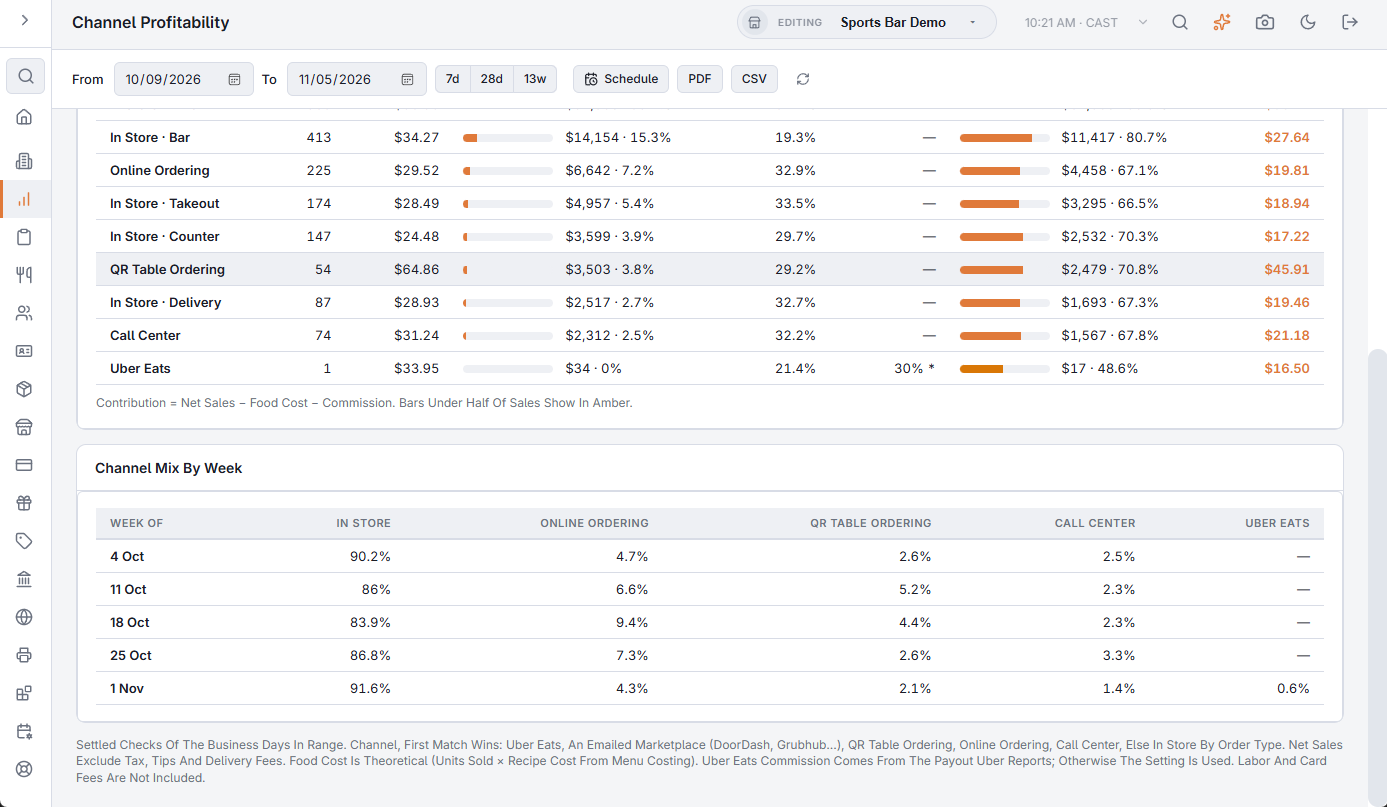
Channel mix by week
When the range covers more than one week (each week starts on the store’s Business Week Start Day from General settings, or on Sunday when it is not set), Channel Mix By Week shows each channel’s share of sales for up to the last 13 weeks, so you can see delivery growing at the expense of dine-in — or the other way round.
Setting the commission rates
Two settings set the estimates: Marketplace Commission Pct (default 25%) for emailed marketplaces and Uber Eats Commission Pct (default 30%) for Uber orders without a payout. Change them in All program settings (search) (search for Commission) to match your contracts.
What to do with it
- A delivery app far below dine-in per check — raise the app’s menu prices (Uber Eats can publish with a markup), trim the menu there to high-margin items, or push guests to your own online ordering.
- An order type with high food cost — check portions and packaging for takeout.