Back Office › Analytics › Performance › Reservation Analytics shows how your bookings actually turn out — no-shows, cancellations, party size, arrival and deposits — and where a deposit or card on file would earn its keep. An empty table held for a party that never came costs a full turn. The page is read-only. It is hidden on plans that don’t include Reservations And Booking.
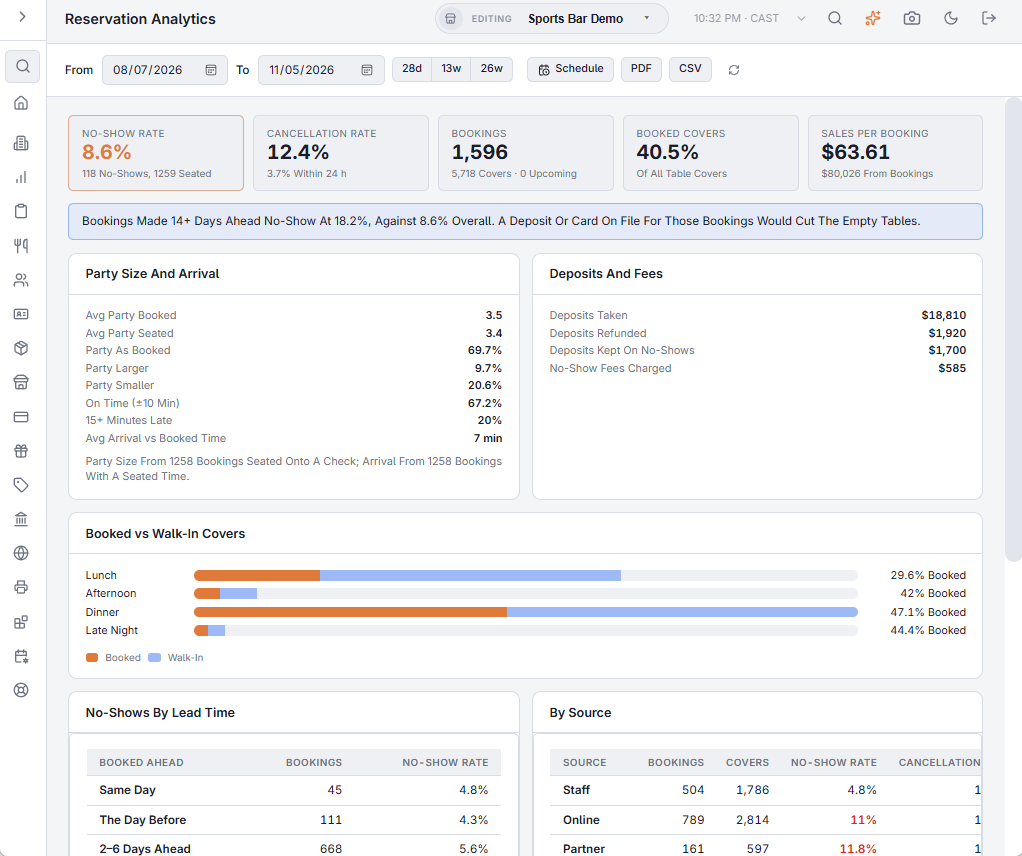
The toolbar
- From and To — the range, by reservation date. The page opens on the 13 weeks up to yesterday.
- 28d, 13w and 26w — the last 28 days, 13 weeks or 26 weeks, ending yesterday.
- Schedule — emails the report as a PDF on a recurrence. See Emailing the performance reports on a schedule.
- PDF (preview, download, email) and CSV — the same report as a file. See Exporting and PDF preview. The file’s section titles, column headings, day names and Yes/No values are in the language the Back Office is shown in; numbers use a dot for decimals with no thousands separator, and dates are written year-month-day, so a spreadsheet reads them the same in any language.
- The refresh button loads the figures again.
When the range has no bookings the page shows No Reservations.
The numbers at the top
- No-Show Rate — no-shows ÷ (seated + no-shows), with both counts. Amber at 10% or more.
- Cancellation Rate — cancelled bookings as a share of concluded ones (seated, no-show or cancelled), with the share cancelled within 24 hours of the booked time.
- Bookings — with booked covers and how many are still upcoming.
- Booked Covers — the share of all table covers that came from a reservation; the rest walked in.
- Sales Per Booking — net sales on the checks seated bookings were moved onto, with the total.
Once there are at least 30 seated and no-show bookings, a blue note reads the result: where no-shows concentrate, whether a deposit would help, or that no-shows are low enough to leave alone.
Party size and arrival
The party booked against the guests on the check it was seated onto: the average of each, and how often the party was as booked, larger or smaller. Arrival compares when the party was seated with the booked time: On Time (±10 Min) counts parties seated from 10 minutes before to 10 minutes after the booked time; a party seated more than 10 minutes early is not on time; 15+ Minutes Late and the average arrival against the booked time follow. The line under the card says how many bookings each figure is based on.
Deposits and fees
Deposits taken and refunded, deposits kept on no-shows, and no-show fees charged. Deposits and no-show fees are set up as described in Deposits, table fees and extras.
Booked vs walk-in, lead time, source and weekday
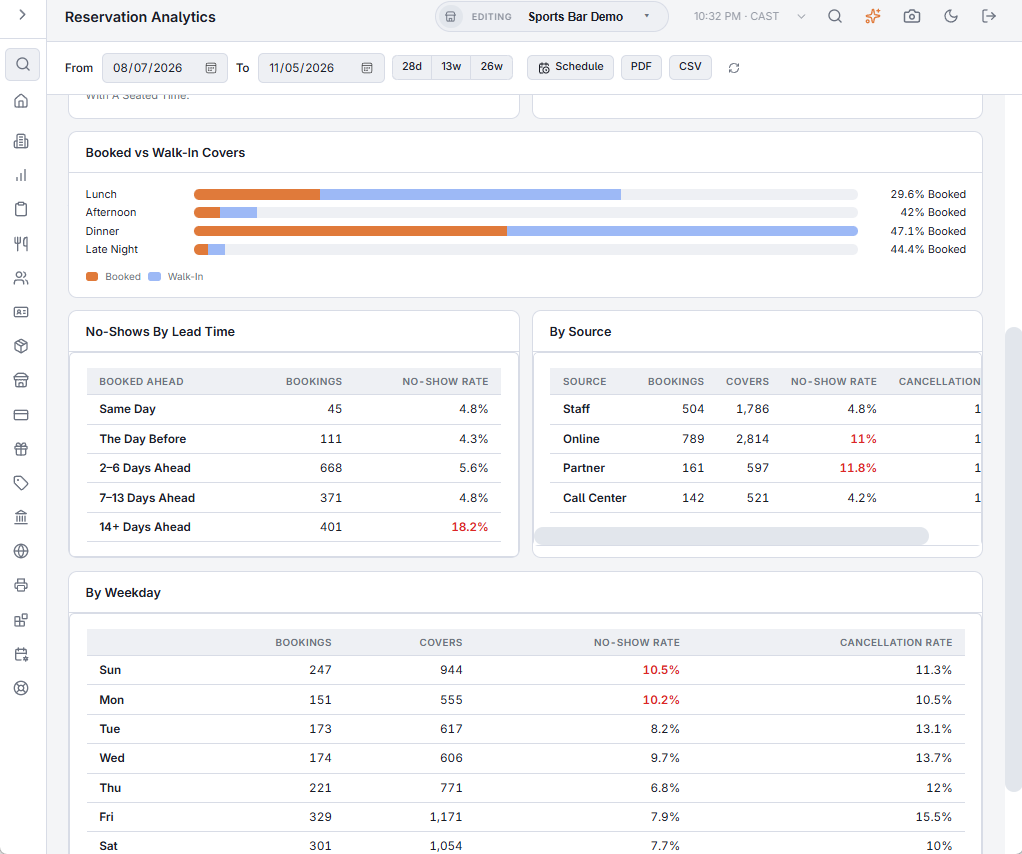
Booked vs Walk-In Covers shows by daypart how much of the room the book fills. No-Shows By Lead Time shows whether bookings made weeks ahead fail more than same-day ones. By Source (staff, online, partner, call center) and By Weekday show where no-shows and cancellations come from; no-show rates of 10% or more show in red.
What to do with it
- No-shows concentrate on one source or lead time — ask for a deposit or card on file only there (online bookings, or bookings made 14+ days ahead), and send a reminder the day before.
- Parties arrive smaller than booked — confirm the party size in the reminder; seat at smaller tables.
- Few covers come from the book — walk-ins carry the room; keep tables free for them at peak.
The AI assistant can answer the same questions: “What’s our no-show rate?”
Combined tables
A party seated across more than one table counts once, with its full guest count, in booked and walk-in covers. When the period has any, a Combined Tables note above the footnote gives their number. See Combining tables for a large party.