Back Office › Store Setup › Manager Screen holds the settings behind the manager tools in More at the register: drawer resets, End of Day, the reports End of Day prints, special events, revenue centers, and which manager buttons each station shows. Switches save the moment you flip them, with a tick to confirm.
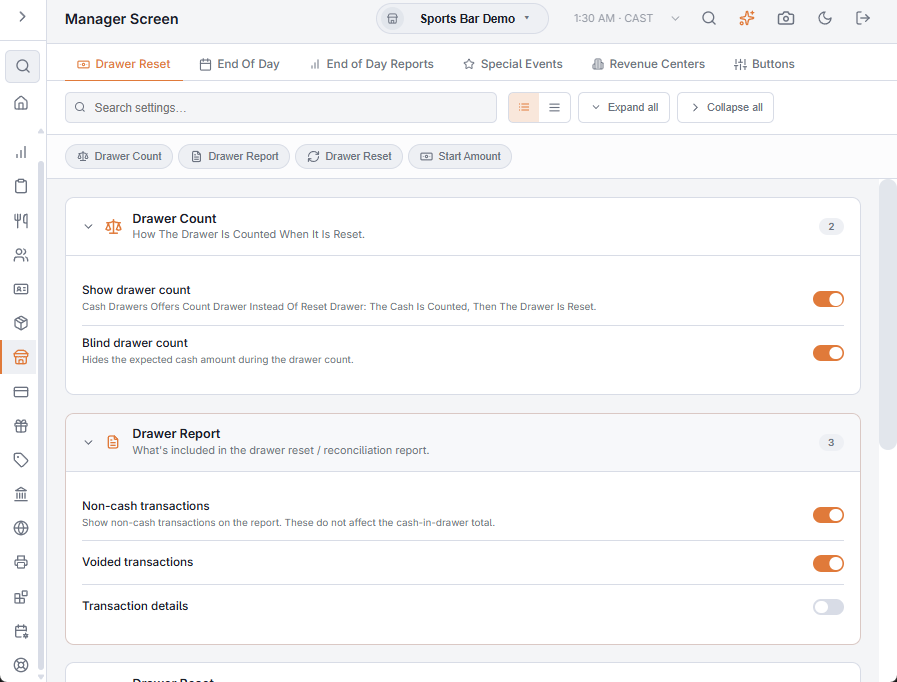
Drawer Reset
What More › Cash Drawers shows and does when a drawer is reset. The reset itself is explained in Drawer reset at end of shift.
| Setting | What it does |
|---|---|
| Show drawer count | Cash Drawers offers Count Drawer instead of Reset Drawer: the cash is counted per currency, and saving the count resets the drawer. Off, the drawer is reset without a count. |
| Blind drawer count | Count screens show only the boxes to type the count in, with no expected amount. The same switch is on Cash Management › Cash Drawers; see Creating and editing cash drawers. |
| Non-cash transactions, Voided transactions, Transaction details | Optional sections of the drawer report. |
| Hide totals | Cash Drawers shows no Cash in Drawer and no drawer report, to anyone, managers included. The report printed after the reset is unchanged. |
| Open drawer after reset | The drawer opens when the reset is saved. Only a drawer whose home is this station opens; a drawer reset from another station, for example with Reset Here at End of Day, stays shut. |
| Print report after reset | Prints the drawer report when the reset is saved. The report is kept in Activity › Cash Logs › Drawer Reset Log either way. |
| Show prompt (Start Amount) | After the reset, Cash Drawers asks for the drawer’s start amount, filled in with the drawer’s default float. The amount entered becomes the drawer’s new default float. Off, there is no prompt. Each drawer’s default float is also on Cash Management › Cash Drawers. |
End Of Day
How End of Day runs: hiding totals, voiding open orders, the checks it makes before it runs (drawers not reset, open pre-authorizations, open orders), emailing the report, and three report switches: whether the report prints, whether scheduled orders are included, and whether the drawer reset reports are added to it. The switches that pick the report’s sections one by one show only while the legacy text report is on. See Running end of day and The end-of-day report.
End of Day Reports
The manager reports in More › Reports, one row each: Button position, Auto Print and Auto Email (printed or emailed when End of Day completes), and Hide (takes the report’s button away). See Reports overlay (mini reports).
Special Events and Revenue Centers
- Special Events — the named events event pricing uses. See Special and event pricing.
- Revenue Centers — the areas sales are grouped by, such as dining room, bar and patio. See Revenue centers.
Buttons
Which buttons the Manager section of More shows on this station: Cash Drawers, End Of Day, Reports, Cash Drops, Employee Banking (Shift Banking) and Shut Down. A button that is off is also not offered by the assistant.
- The switches are kept on the station itself, so change them in Back Office on the register you want to change. Other stations are not affected.
- A switch never changed is on. The More menu picks up a change the next time it opens.
- The other manager buttons are always there for anyone allowed to use them.