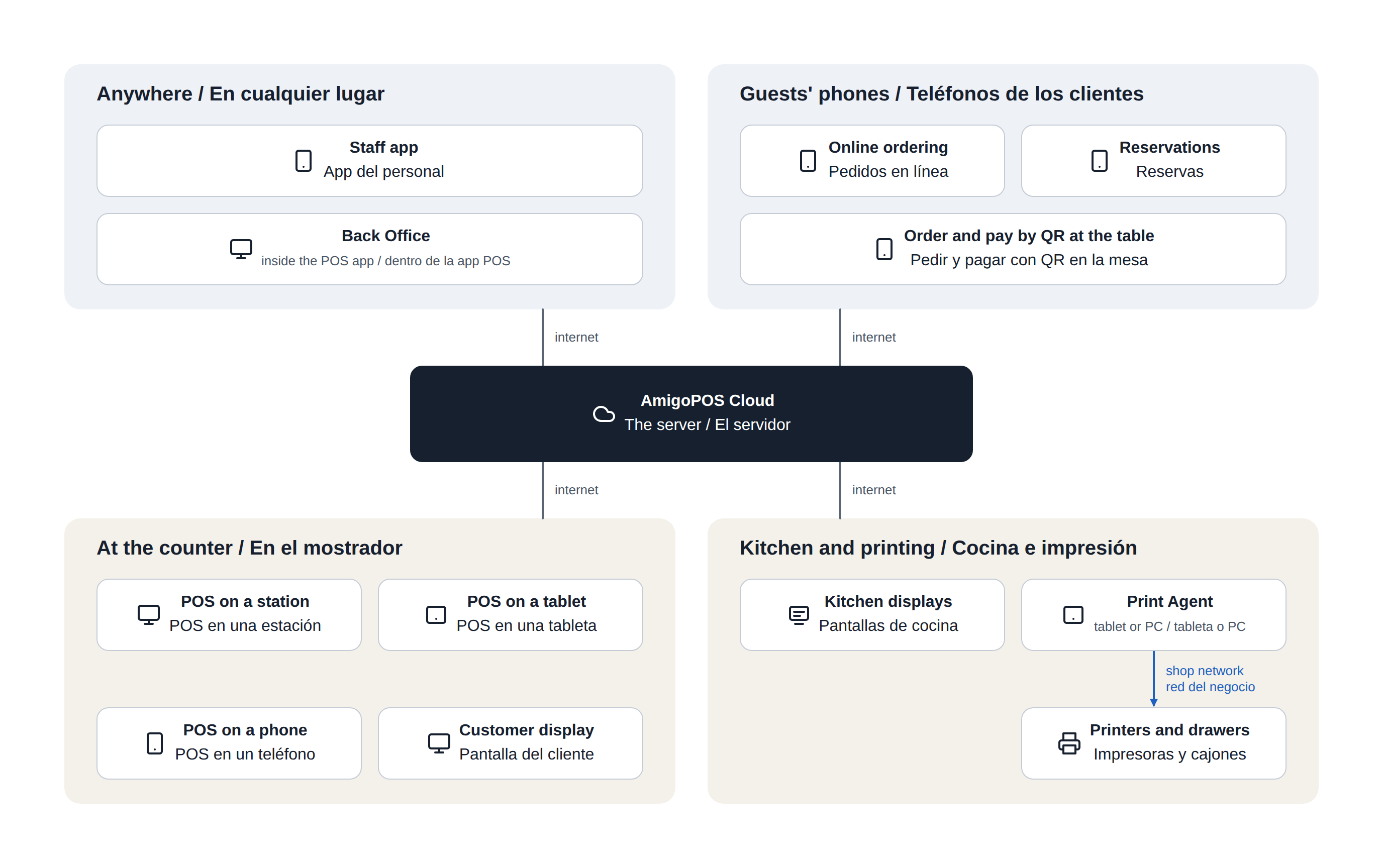
CloudPos is one system made of several apps. Each app runs on its own kind of device, and all of them talk to the same server over the internet. The apps do not talk to each other directly: each one talks to the server, and the server passes changes on to the others. In the diagrams the server is shown as AmigoPOS Cloud.
The four groups
- At the counter. The register is the POS app. The same app runs on a Windows station, an Android tablet or a phone, and adapts its screens to the device. A customer display shows the guest their order; it is a second screen on the register or a separate tablet paired with it.
- Kitchen and printing. Kitchen displays show tickets on a screen. The Print Agent is a small app that owns the printers: it receives print jobs from the server and sends them to the printers over the shop's network. Cash drawers are plugged into printers.
- Anywhere. Employees open the staff app on their own phones for their schedule, clocking in and out, tasks and messages. Managers get more on the same staff app: the day’s numbers and alerts, approvals and the log book. Back Office, where the system is set up and reports are run, is inside the POS app.
- Guests' phones. Guests order online, book a table, and order or pay at the table by scanning a QR code. They use the browser on their own phone; there is nothing for them to install.
Who uses what
| App | Runs on | Who uses it | What for |
|---|---|---|---|
| Register (the POS app) | Windows station, Android tablet or phone | Servers, bartenders, cashiers | Orders, tables and payments |
| Back Office | Inside the POS app, on a station or tablet | Managers and owners | Menu, employees, settings and reports |
| Customer display | A second screen on the register, or a tablet paired with it | Guests at the counter | The order as it is rung up, the total, the tip and the receipt |
| Kitchen display | Windows or Android screen or tablet | Kitchen, bar and expo | Tickets to prepare and bump |
| Print Agent | Windows PC or Android tablet | Nobody day to day; it runs on its own | Printing tickets and receipts, opening cash drawers |
| Staff app (the staff site) | The employee's own phone, in the browser | Every employee; managers see more | Schedule, clocking in and out, tasks, messages, hours and tips; for managers, the day’s numbers and alerts |
| Online ordering | The guest's phone or computer | Guests | Takeout and delivery orders |
| Reservations | The guest's phone or computer | Guests | Booking a table |
| QR at the table | The guest's phone | Guests | Ordering and paying from the table |
How printing works
A register does not print by itself. Every ticket and every receipt takes the same route:
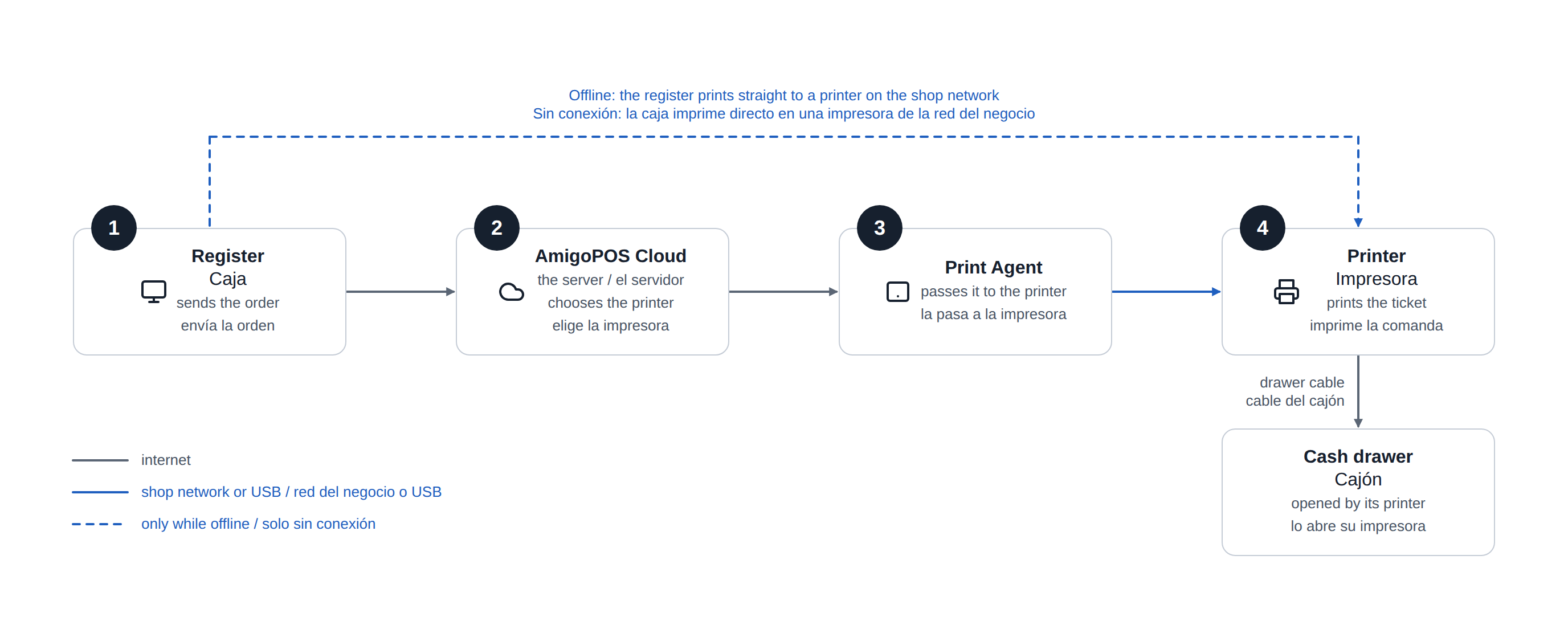
- The register sends the order to the server.
- The server decides which printer each ticket goes to, from the print routing set up in Back Office.
- The Print Agent receives the job and passes it to the printer, over the shop's network or, on a Windows Print Agent, a USB cable.
- The printer prints. A cash drawer is plugged into its printer, and the printer opens it.
This is why the Print Agent has to stay running, and why one Print Agent can serve every register in the shop.
The one exception is an outage. A register that cannot reach the server prints straight to a printer on the shop's network. See Kitchen tickets during an outage.
What needs the internet
Every app talks to the server over the internet. Printers and cash drawers do not: the Print Agent reaches them over the shop's own network. If the internet drops, registers keep taking orders and cash, and catch up when it returns. See How offline mode works.
Where to go next
- What is CloudPos: what the system covers.
- Opening the back office.
- Customer display overview.
- KDS overview and ticket layout and The KDS app for Windows and Android.
- Print Agent overview, Setting up printing, start to finish and Print routing.
- Using the staff site on your phone: the staff app, and Today for managers.
- For guests: Incoming web orders at the register, Online booking and reminders, QR table ordering and QR pay at table.